 to toggle between the Virtual
Synth Keyboard,
Drum Pad and Symbol Pad
views.
to toggle between the Virtual
Synth Keyboard,
Drum Pad and Symbol Pad
views.Symbols and Adornments
Touch the Pad button
to toggle between the Virtual
Synth Keyboard,
Drum Pad and Symbol Pad
views.
The Symbol Pad presents a pallet of notation symbols that can be dragged directly into the score:
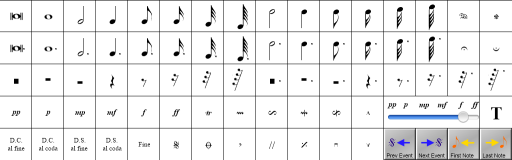
Note that not all symbols currently result in MIDI output and are purely for adornment at this time. "Active" symbols are discussed below - scroll this page down to see more details.
The top three rows on the Symbol Pad contain all of the most common note and rest symbols. This avoids the need to select each note type individually and can save a lot of time during the creation of a score.
Use the  symbol to drag a "sustain pedal on" event into the music, and the
 symbol to
release the pedal. This symbol affects the current track only.
symbol to
release the pedal. This symbol affects the current track only.
Use the  or
or  symbols to "hold"
the music at the specified position. The notes at that position will be
played with twice their normal duration.
symbols to "hold"
the music at the specified position. The notes at that position will be
played with twice their normal duration.
The  through
to
through
to  symbols can be used to
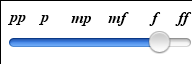
control the loudness of the notes being played. These symbols affect the
current track only and work by adjusting the MIDI note velocity.
symbols can be used to
control the loudness of the notes being played. These symbols affect the
current track only and work by adjusting the MIDI note velocity.
This control is the default MIDI velocity used for new notes.
Use the Velocity control to adjust the loudness of each individual note as you
drag it into the score.
Text Adornment or Comment Entry
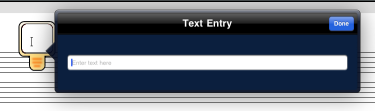
Text may be placed anywhere in the score by using the
 symbol. Drag the
symbol over the score and a text cursor will be displayed.
symbol. Drag the
symbol over the score and a text cursor will be displayed.
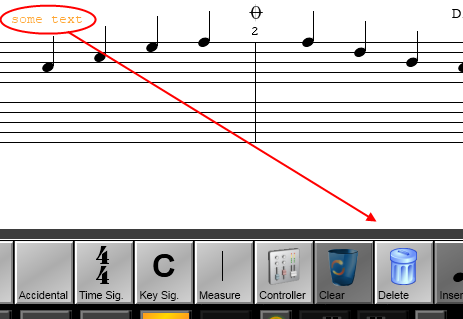
To remove text adornments, first touch the text so that it is displayed in orange, and then touch the Delete button on the main toolbar:

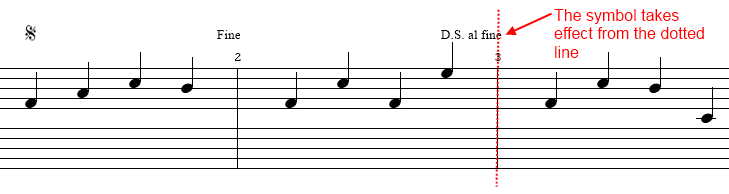
The coda, segno and fine symbols can be used to alter the flow of the music, by jumping from one passage to another. Note that these symbols affect all tracks.
Use the "D.C. al fine" symbol to mark a point at which the music should be replayed from the beginning of the song, until a "Fine" symbol is reached.
Use the "D.C. al coda" symbol to mark a point at which the
music should be replayed from the beginning of the song, until a coda
 symbol is reached.
The playback will then jump to the next coda
.
symbol is reached.
The playback will then jump to the next coda
.
Use the "D.S. al fine" symbol to mark a point at which the
music should be replayed from the last segno (sign) ,
until a "Fine" symbol is reached.
,
until a "Fine" symbol is reached.
Use the "D.S. al coda" symbol to mark a point at which the
music should be replayed from the last segno (sign)
, until a coda
symbol is reached.
The playback will then jump to the next coda
.
Note that placement of the symbols is very important to ensure correct playback. For best results, line up the right edge of the symbol with the position at which you would like the symbol to take effect.
Jumping to the Previous or Next Event
Use these buttons to quickly scroll the song to the next or previous coda, segno or MIDI controller event in the current track. This can be useful when editing a song. When an event is found, the position is automatically selected.
Jumping to the First or Last Note in a Track
Use these buttons to quickly scroll the current track position to the first or last note.