Chord Builder
Use Chord Builder to select a chord by name and insert the notes making up the chord directly into the song. Chord Builder can also be used as a tool to hear how each chord sounds, and how it is played on a piano keyboard.
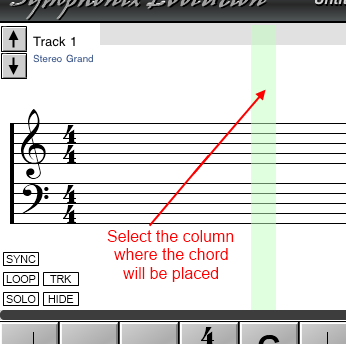
To access the Chord Builder, first select the position in the song where you would like the chord to be notated. You'll also need to ensure that the current note duration matches the length of the chord:
Now touch inside the green selection area to display the Selection menu:
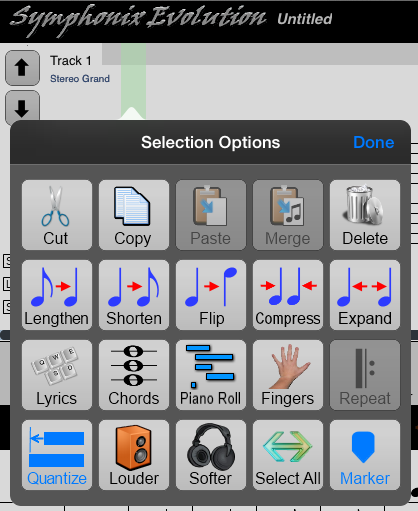
Choose the "Chords" function to open Chord Builder
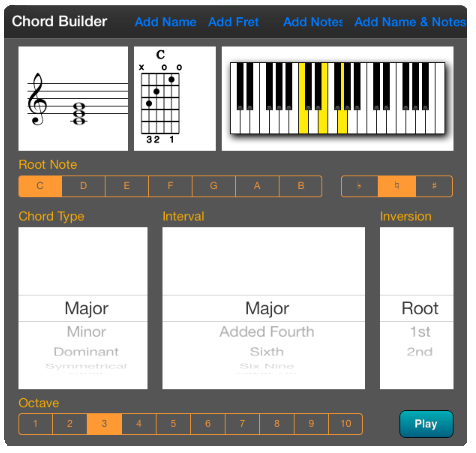
Use the Chord Builder screen to select the chord to be inserted into the song:
The top left panel shows the chord notated as music in the current key signature. This screen updates as different chords are selected.
The top center panel shows the guitar fret diagram for the chord, if available.
The top right panel shows how the chord would be played on a piano keyboard.
The Root Note and Accidental allow the chord root to be chosen. For example, select a Root Note of "E" and accidental of "b" to choose an E-flat chord.
The Chord Type determines the chord's character, eg Major, Minor, etc
Use the Interval to select different chord variations
All possible chord inversions may be selected from the Inversion panel.
After choosing the type of chord, select the Octave to determine the pitch at which the chord will be played (middle "C" is in Octave 4).
Use the "Play" button to hear how the chord sounds without making any changes to your song.
Once a chord has been selected, press the Add Notes button to accept it and update the notation.
For example, selecting a "C Minor" chord will appear as follows:
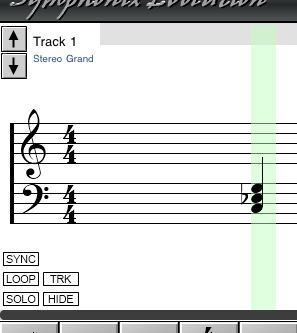
Alternatively, the "Add Name" button will add the chord name to the song without adding the actual notes, and the "Add Name" button will add the guitar fret diagram to the song.